The AI go-to-market team
The follow-up you never get round to.
You built something useful. Now you need the right businesses to hear about it. Your team helps you find prospects, prepare a relevant approach and follow up in your voice. You approve what goes out.
No seats. No credits. No blank pages. Nothing sends without your say-so.
Find the right people. Then follow through.
Before you spend time on an approach, know why that business is worth it. Scout fits between research and outreach, helping you choose where your sales effort goes.
- Step 1
Find businesses
Harvester + you
Discover businesses in your niche, or bring your own list. You choose which candidates to import.
You get: A list of real prospects.
- Step 2
Check the evidence
Ads scan + Prep
Check recent Google ads and research the business. Deeper Prep looks for a need your offer could solve.
You get: Dated findings and sources.
- Step 3
Choose who to pursue
Scout shortlist · Preview
Compare saved evidence of advertising, need and business capacity. See who merits a conversation and what is still unknown.
You get: Priorities with reasons.
- Step 4
Prepare the approach
Writer + you
Open a lead you want to pursue. Prepare a relevant message and private page, grounded in what you know.
You get: An approach ready to review.
- Step 5
Approve and follow up
You + Nurturer
Review the outreach before it sends. Use the conversation to confirm the problem, buyer and budget, then agree the next step.
You get: Approved outreach and follow-up.
Scout shortlist is a preview, built for review. It ranks businesses already in your project. Deployment and a live pilot are still ahead. The existing weekly Scout listener researches niche pains and events separately.
How does Scout decide who is worth a conversation?
The shortlist requires four things together:
- Recent Google ad-library evidence, checked within 30 days.
- A quote from the business showing a need matched to your current offer.
- Two different capacity signals: locations, team or published pricing.
- A business email or phone so you have a way to reach them.
Example, not a customer result: a clinic has recent ads, several locations and a team page. Its website says nothing about slow enquiry handling. It stays in Needs evidence. Advertising alone does not prove it needs your follow-up solution.
Leads that pass appear under Prioritise discovery. Confirm the actual problem, who decides and the budget in conversation. Public capacity signals cannot establish what someone can or will pay.
Opening the shortlist reads saved research. It does not launch searches, import businesses or send messages.

Jules, your Strategist
You’ve got the research.
What’s the next move?
A list of prospects is another thing to work through. Jules connects what your team has learned to a person, a reason to talk and a brief you can act on.
In your ActionMode account. Daily suggestions are your choice.
A person worth approaching
Up to three next moves for people already in your pipeline, using their saved research and the signals you’ve kept.
The reason, with the source
See what prompted the suggestion, when it was observed and what still needs checking. Weak website scans are held back.
A next step you can choose
Prepare a message or article with the Writer, or add a call to Today. You review the work before anything goes out.
Sometimes the useful answer is “not enough evidence yet”. Jules can return no moves. Your existing replies and follow-ups come first.
That lead in your CRM?
Give it a next move.
Keep the tools you already know. Bring a CRM contact, a website enquiry or a meeting summary into ActionMode. Your team prepares the follow-up; your workflow hears when it’s ready for you.
Preview — built, not open yet. API and webhook access is still disabled. Explore the workflows now; connection setup opens after activation.
Bring the lead
Your CRM or form passes the contact and enquiry through your automation.
Prepare the next move
Ask ActionMode for a draft with the right context. Review it in Comms.
Keep your tools in the loop
A webhook tells your workflow the draft is ready, so it can notify your team.
A new enquiry. A relevant opener.
Pass the prospect’s own question into a draft brief, so your reply starts in the right place.
A good call. A clear follow-up.
Save the agreed notes with the lead and include the next steps in the draft request.
Several clients. A flow for each.
Use separate project connections to route each client’s leads and team notifications.
API and webhooks connect through HTTP steps in n8n, Make, Zapier or your own service. Native CRM sign-in and automatic two-way sync are planned. ActionMode’s existing MCP connection is a separate way to work with your team from a compatible AI assistant.
Eleven things the team does.
Real screens, nothing staged.
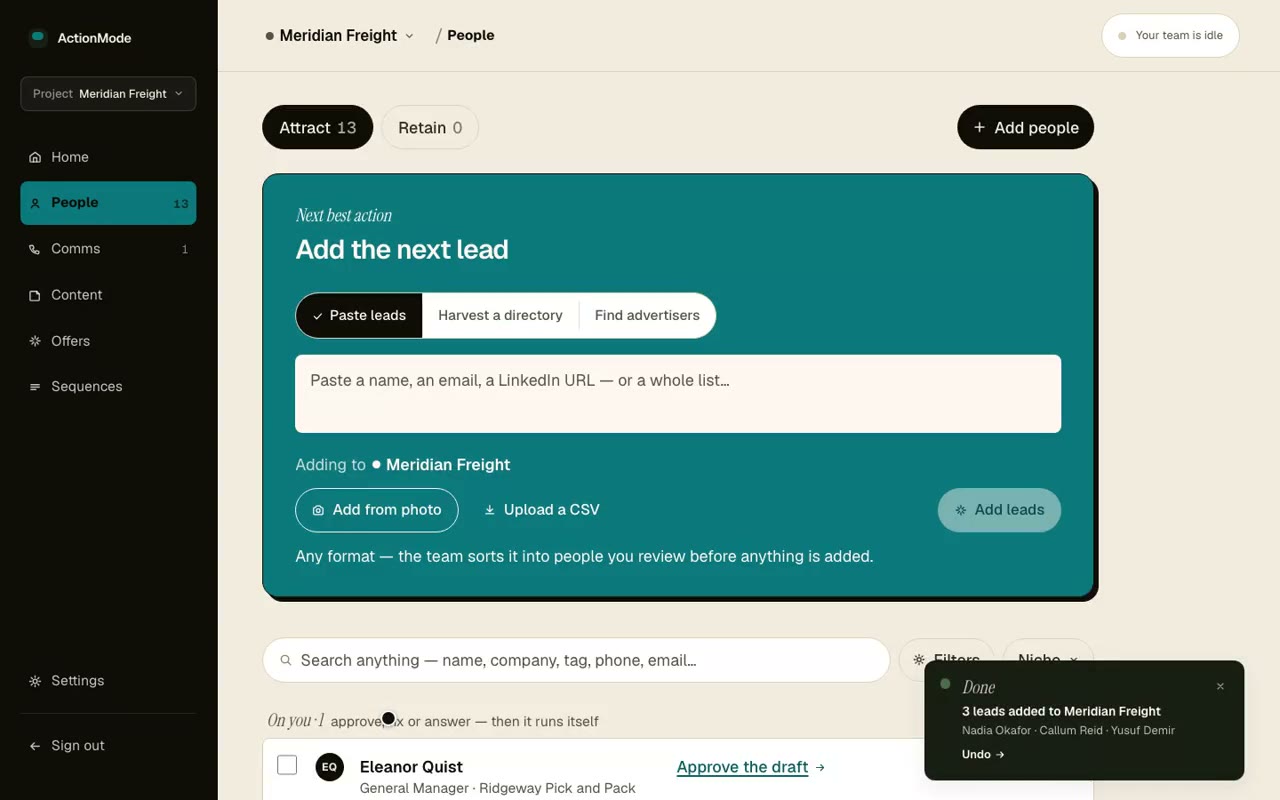
Paste a signature, a card, a Clay export. The team turns it into clean leads and starts researching each one.
Start with your niche →Hear it explained
Thirty seconds, with the sound on
The clips above are the product running. This one says why it matters — what the team does with twelve names on a list so you never have to face the list again.
Watch all six filmsYour three
Twelve leads on a list is not a plan, it is a way to feel busy and ring nobody.
We don't sell software.
We sell pipeline.
Not a CRM.
A CRM is a system you hire someone to operate. ActionMode is the someone. There is no pipeline to groom — the team grooms it.
Not a content tool.
Content tools hand you a blank box and wish you luck. Your team turns up with the work already written, already fact-checked, and asks for a yes or a no.
Not another AI SDR.
An AI SDR bolts onto a sales team you already have, and does one job: outbound. You have no team, and outbound alone was never the gap. This is the whole function — content, leads, pages and follow-up, in one voice.
Say it to Claude.
It's done before you've put your phone away.
Sarah Okafor
Riverside Podiatry
Your team
Sarah Okafor, Riverside Podiatry — added. Her private page is live at sarah-okafor.actionmo.de.
Researching Riverside now, then drafting the opener in your voice. It'll be in your queue by the time you're back at the car.
You meet someone worth chasing at the expo. You'll add them later. Later is the thing that never happens.
Because the follow-up lives in an app you'd have to open, on a laptop you're not at.
So your team now listens inside Claude, where you already are. Photograph the card, say what you want. The lead, her private page, the research and the first email are waiting for one approval when you get back.
Things you can just say
Every write is staged. None send. One key covers every niche you run, and one click in Settings revokes it.
Works in the Claude app today, and in any assistant that speaks MCP.
Everything it does, it does under your name.
Not a platform your leads can see. Your domain, your address, your numbers.
Your domain
Every lead's page lives at go.yourcompany.com/their-name. The link reads as you, and so does the preview card when they share it.
go.acme.com/sarah-lin✓ private · ✓ ssl · ✓ your nameYour sending address
Emails leave from you@yourcompany.com, verified, so the deliverability you earn stays yours and nothing looks like a platform.
FromDana Whitlock <dana@meridianfreight.co.uk>- Coming
Your analytics, read
Connect Google Analytics once. The team already keeps your last 28 days of visitors; next it tells you which page to fix and why.
Set up once in Settings. Ten minutes, two DNS records, then forget it.
A team, not a tool.
Every teammate has a name, a job, and an audit trail. You can see what each one did and why — their status is drawn from real runs, never faked for show.

Maya
The Profiler
Learns your voice, your style, your no-go list — and holds the whole team inside it.

Cole
The Harvester
Reads your industry's own registers so the list is real businesses, not scraped junk.

Rae
The Prospector
Turns up already knowing who they are — size, fit, and an angle worth opening with.

Jules
The Strategist · Beta
Connects saved research to your next conversation, with the source, the reason and a brief for you to review.

Finn
The Writer
Arrives with the draft already written. You have never once faced a blank box.

Vera
The Editor
Off-brand, or anywhere near your no-go list? It doesn't pass. That's the whole job.

Otis
The Fact-Checker
Checks every claim and link against the live web, so you don't have to trust yourself at 11pm.

Nova
The Nurturer
Sends touch two, three and nine — the ones you meant to send. You approve; it remembers.

Kaz
The Coordinator
Makes sure nobody gets contacted twice, or chased after they've already answered you.

Sable
The Scout
Listens for pains and upcoming events in your niche. A new shortlist, in preview, helps you choose which researched businesses to pursue.
More teammates join the crew as they earn their place — each one ships real, audited work before it gets a name on this page.
The price for your niche.
Priced per niche, not per seat. Setup plus monthly. I size it on what a new customer is worth to you, so I need two things first.
Within one working day you get:
- the price for your niche
- the first 10 people we'd go after
- one draft in your voice, free
Dil, founder
The things founders ask first.
How does it choose who I should approach next?
Jules, the Strategist, connects saved research about people in your pipeline with the niche findings and signals you’ve kept. Next moves shows up to three suggestions, their sources and what still needs checking. You choose whether to prepare a message, an article or a call. The feature is in beta and can return no suggestions when the evidence is too thin. Preparing work never sends it.
Will Scout find businesses that need my solution and can pay?
The new shortlist is in preview. It checks your existing leads for recent Google ads, a sourced need matching your offer, signs of business capacity and a contact route. Leads with missing evidence stay in research. It helps you choose who to investigate; you still confirm their actual problem, decision-maker and budget in conversation. Finding and importing new businesses are earlier steps in the workflow.
Will it sound like me?
That's the first job. At onboarding the team studies things you've actually written and builds a voice profile it obeys forever. If a draft doesn't sound like you, it gets held, not shipped — voice fidelity is the rule everything else bends to.
Can it send things without my permission?
No. Outreach is gated behind your approval — a click in the daily email or the dashboard. Nothing cold ever auto-sends. As trust builds you can let routine work proceed on a veto window: you see it before it happens, and doing nothing lets it go.
What stops it making things up?
A dedicated Fact-Checker runs before anything is publishable — claims verified, links checked. Your no-go list (topics, competitors, claims you never make) is enforced on every draft. If something can't be verified, it doesn't ship.
What's a niche?
One product aimed at one audience — your dental-lab software, your logistics tool. Pro puts the whole team on one niche. Agency runs the same team across up to four, each with its own voice, audience and no-go list.
What do I actually have to do?
Read one email a day. Approve or veto. Everything else — research, writing, fact-checking, lead pages, follow-up — is the team's job. If you never open the dashboard, the work still moves.
Can I cancel?
Anytime, from Settings, in two clicks — Stripe handles it. The team works to the end of the period you've paid for, and everything it produced stays yours.